An analytics team wants an external LLM to summarize a Snowflake table of support tickets. The email and customer name columns already have a masking policy, so analysts without access to those columns see asterisks.
A Snowflake masking policy is a schema-level object that masks column values at query time according to the querying role and other context, while the stored data stays unchanged. The policy decides what each role sees in Snowflake query results; it does not control which of those results someone sends to an outside model, or how the model’s answer maps back to real records.
CUBIG’s review of Semrush US data in November 2026 found about 140 monthly searches for “snowflake masking policy,” with Snowflake’s own documentation holding several of the top 10 results. Setup questions already have good answers. This article takes the next question: what happens to a masked column once someone puts it into an LLM prompt?
What does a Snowflake masking policy do?
Snowflake dynamic data masking is a Column-level Security feature that uses masking policies to mask plain-text data in table and view columns at query time, as the Snowflake guide to Dynamic Data Masking describes. Depending on the policy conditions, the SQL execution context, and role hierarchy, a query returns the plain-text value, a partially masked value, or a fully masked value.
Snowflake does not change the stored data. The Snowflake column-level security overview states that sensitive data in an existing table is not modified, so there is no static masking. Administrators write policy conditions with conditional expressions and context functions such as `CURRENT_ROLE`, `INVOKER_ROLE`, or `IS_ROLE_IN_SESSION`, or with a custom entitlement table.
According to the same overview, administrators choose how a policy masks a value. A policy can call built-in functions such as `REGEXP_REPLACE` or `SHA2`, a user-defined function, or an external function. Snowflake’s External Tokenization feature uses external functions and a third-party provider: data is tokenized before it loads into Snowflake and detokenized at query runtime for authorized roles.
Snowflake offers related controls as well. Tag-based masking policies apply a policy through tags, and a policy assigned directly to a column takes precedence over the tag-based one. When an agent is active in the execution context, a policy can use `IS_AGENT_ACTIVATED` to mask values even when the user’s role would otherwise see them unmasked. For unstructured text, Snowflake offers AI_REDACT, a fully managed Cortex AI Function that uses a large language model to help detect, locate, and redact personally identifiable information (PII) in unstructured text.
What does an LLM receive when a masked column goes into a prompt?
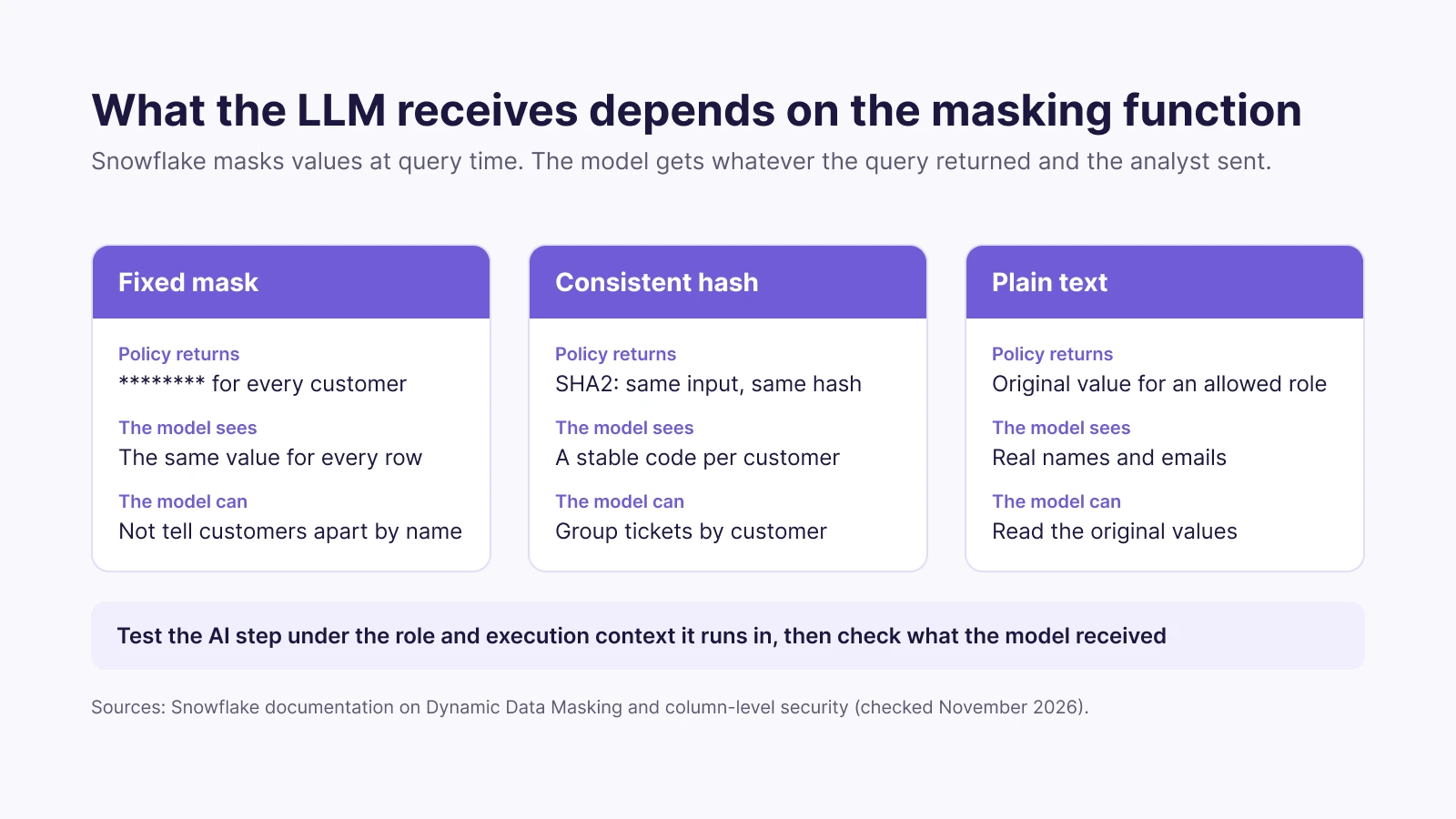
The model receives whatever the query returned and the analyst sent. The masking function decides what that looks like in the support ticket example:
- Fixed mask: a policy that returns `****` makes every customer name look the same, so the model can’t tell two customers apart from that column alone.
- Consistent hash: a policy that uses `SHA2` gives the same input the same output, so the model can still group tickets by customer without reading the name.
- Plain text: an analyst whose role can see plain text exports original names and emails, and the model receives them.
The masking policy decides which values appear in the query results. The analyst’s export and prompt decide which of those results reach the model. A masked column therefore gives the model different information depending on the function behind it.
Snowflake’s masking documentation describes what a query returns. For a Snowflake-side AI step, the team should run the step under a role that cannot see plain text and under the execution context it will actually use, such as with an agent active, and check exactly what the model receives, instead of inferring the AI input from what a separate analyst query displays.
Where do Snowflake masking and LLM Capsule overlap, and where do they differ?
Snowflake masking and LLM Capsule both keep original values away from people or systems that shouldn’t see them. Snowflake masking decides what each role sees in Snowflake query results. LLM Capsule works on the copy that goes to an approved AI path.
LLM Capsule is CUBIG’s Context-Preserving Data Layer for AI. LLM Capsule replaces sensitive or controlled values with context-preserving stand-ins, sends the protected working copy to an approved AI path (an LLM, RAG, or an agent), and maps the stand-ins in the response back to the original business values. The substitution and the mapping run in the customer’s controlled environment, and the customer decides what to protect, which relationships to keep, which model paths to allow, and which system restores the results.
Some masking approaches, including consistent hashing and Snowflake’s External Tokenization, already keep links between records. The practical question is whether the chosen approach keeps the relationships one AI task needs. Snowflake’s masking documentation does not describe mapping an outside model’s answer back to original records.
| Question | Snowflake masking policy | LLM Capsule |
|---|---|---|
| Where it applies | Snowflake table and view columns at query time | The working copy sent to an approved AI path (LLM, RAG, or agent) |
| What decides who sees original values | Policy conditions, SQL execution context, role hierarchy, context functions or an entitlement table | Protection rules the customer sets; the customer also decides who may reveal an original value on screen |
| What the AI receives | The query output: plain text, a partial mask, a fixed mask, a hash, or a token | A protected working copy with context-preserving stand-ins |
| What happens to the AI response | Outside the scope of Snowflake’s masking documentation | LLM Capsule maps stand-ins back to original values in the system the customer chooses |
| Who sets the rules | Snowflake administrators write policies and conditions | The customer sets values to protect, relationships to keep, allowed model paths, and the restore system |
| What to verify | The query output under the role and execution context the AI step uses | Supported models, deployment location, input formats, and restore scope for the customer’s environment and contract |
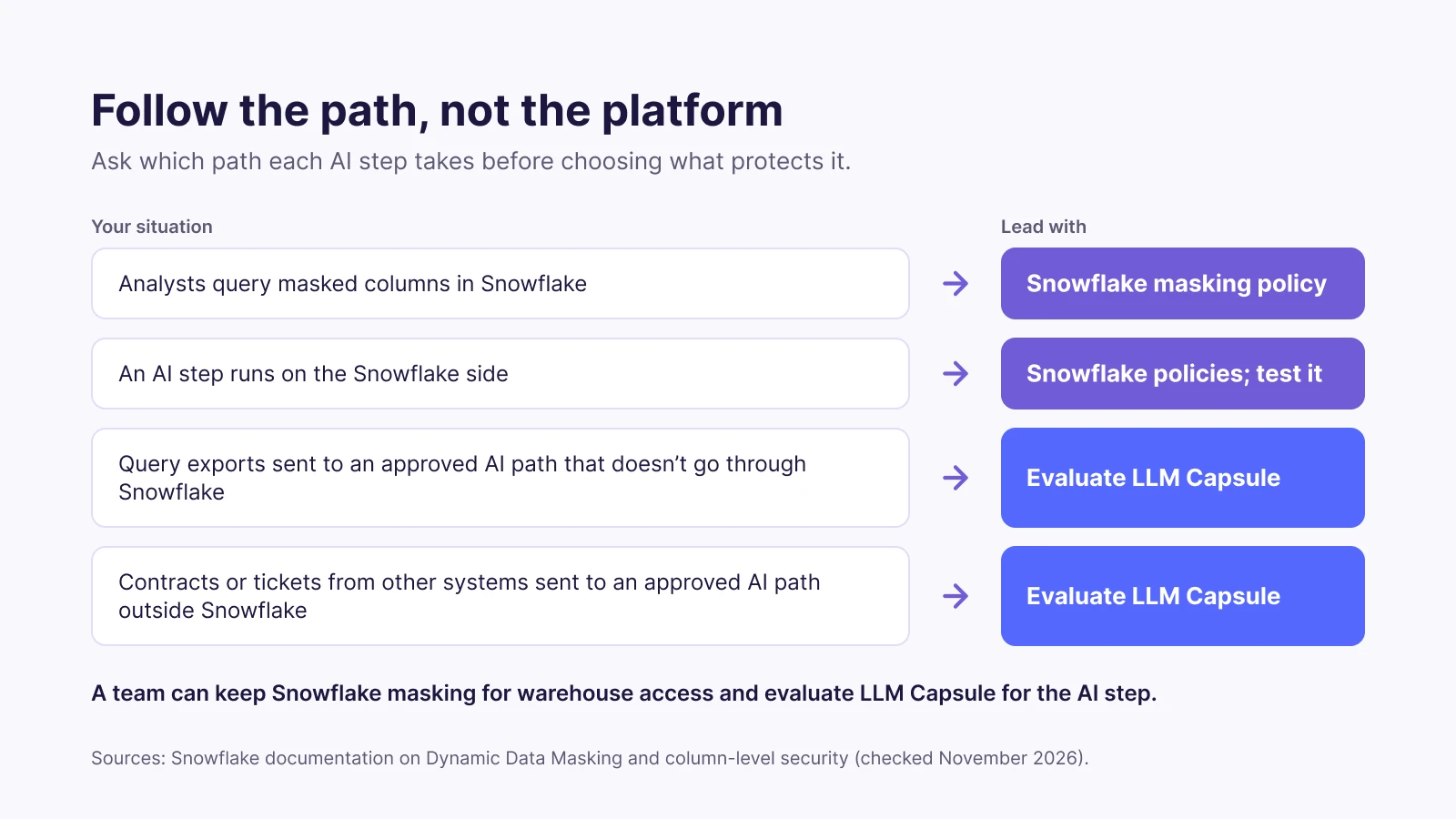
Following the data path works better than dividing systems into inside and outside Snowflake. For Snowflake queries and Snowflake-side AI functions, the team works with Snowflake’s policies and tests what each step receives under the role and execution context it runs in. Query exports and documents from other systems sent to an approved AI path that doesn’t go through Snowflake are where a team evaluates LLM Capsule. The same path-based split appears in Salesforce Data Masking vs LLM Capsule.
When does a team use both?
A team can keep Snowflake masking policies for warehouse access and evaluate LLM Capsule for the AI step. In the support analytics workflow, analysts query ticket data in Snowflake, where masking policies decide which roles see customer names and emails. When the summary needs real customers, a role that can see plain text exports selected records, and the team sends that copy to an approved external LLM to summarize recurring problems. The Snowflake policy governs the query; LLM Capsule protects the copy that goes to the model and maps the answer back when the workflow needs the real records.
The same split applies when an AI workflow combines warehouse exports with contracts or tickets from another system. Snowflake masking still governs the warehouse columns, and the team evaluates LLM Capsule for the working copy that enters the approved AI path.
CUBIG confirms supported models, deployment location, input formats, and restore scope for each customer environment and contract, along with whether the needed relationships hold across many records. Teams should not assume a ready-made Snowflake connector. For the governance side of a Snowflake estate, Snowflake Horizon vs Syntitan covers how Horizon’s semantic context, governance, and lineage differ from what Syntitan records about the data behind a specific AI run.
Restoring values correctly does not make the AI answer correct. A model can still write an inaccurate summary or pick the wrong tickets after every value maps back to the right record, so the team should check answer quality separately from protection and restoration.
How do you compare them on your own task?
Start with one real AI task the team already understands, such as a weekly support ticket summary or a customer-level analysis. Then mark which path each step takes: a Snowflake query or Snowflake-side AI function, or an export or document sent to an approved AI path that doesn’t go through Snowflake.
Where a task can run through both setups, compare them on that task under the same protection conditions. For data only one setup can reach, compare LLM Capsule with the team’s current method. Give each setup the same source data, protect the same values, and run the same AI task. Count four results:
- Protection misses: sensitive or controlled values that reached the AI path when the rules said they shouldn’t.
- Answer errors: wrong or incomplete results from the model.
- Incorrect restoration: stand-ins mapped back to the wrong original value.
- Manual checking: the review work needed before anyone could use the result.
Reviewers should read the actual prompt input and the returned response, and record the test conditions: the Snowflake role, the approved AI path, the protected values, and the system where results are restored. A task that groups tickets by customer needs consistent relationships across records; a task that summarizes single tickets may not.
Talk to CUBIG about testing LLM Capsule on one of your AI tasks.