A sales operations team uses Salesforce AI to summarize CRM records before customer calls. Now the same team wants to send contract PDFs and ERP order history to an external LLM.
Salesforce data masking covers two different jobs: Salesforce Data Mask hides sensitive data in sandbox orgs, and the Einstein Trust Layer masks selected PII and PCI in prompts for embedded Salesforce generative AI features before they reach a large language model, then restores the original values in the response. Both protect data on Salesforce’s own paths.
CUBIG’s review of Semrush US data in November 2026 found about 210 monthly searches for “salesforce data masking,” and a Salesforce Help page on data masking for AI foundation models ranks in the top 10 results for that term. That ranking suggests that people who search the term also look at how Salesforce protects data that AI reads, not only sandbox masking.
What does Salesforce Data Mask do?
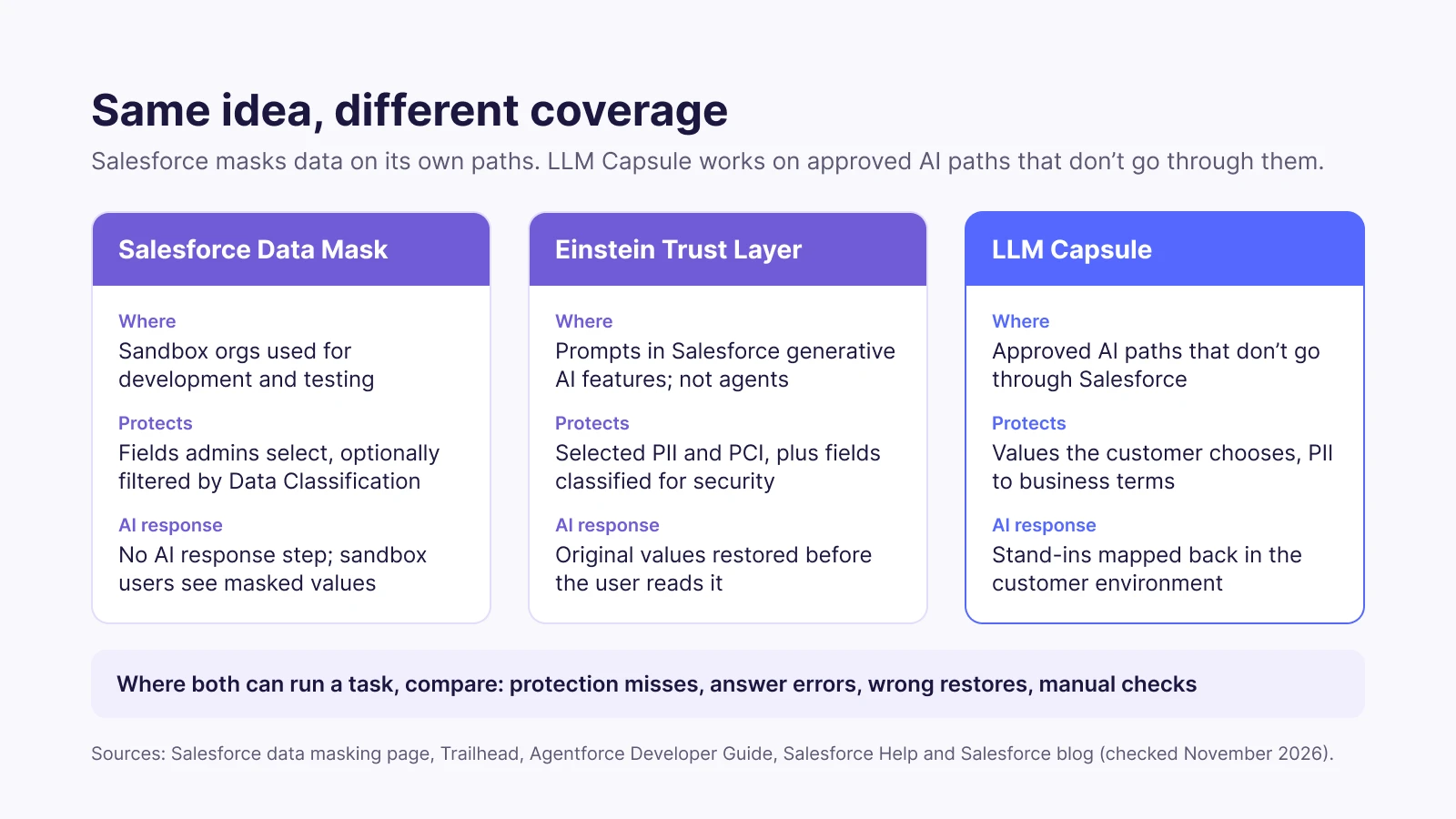
Salesforce Data Mask protects sensitive information in sandbox orgs. Salesforce ships it as a managed package that admins install and configure in a production org to mask sensitive data in full or partial sandboxes used for development or testing.
Administrators choose how to mask each field. The Salesforce data masking product page lists anonymization, pseudonymization, pattern-matching, and deletion as options, and admins can use Data Classification to filter which fields to mask. According to the Salesforce Data Mask Trailhead module, deletion turns the selected sandbox data into empty values, and once sandbox data is masked, it can’t be unmasked.
Salesforce describes Data Mask for sandbox orgs, not for AI prompts. A team planning AI work should first map where its data lives: contract PDFs and ERP exports from other systems sit outside the sandbox scope.
How does the Einstein Trust Layer mask data in LLM prompts?
The Einstein Trust Layer, called the Agentforce Trust Layer in newer Trailhead modules, protects prompts rather than sandboxes. Salesforce describes the flow in its developer guide on data masking with the Models API:
- The Trust Layer detects selected personally identifiable information (PII) and payment card industry (PCI) data in a prompt.
- The Trust Layer replaces each detected value with placeholder text based on what the value represents.
- Salesforce sends the masked prompt to the LLM.
- When the LLM responds, the Trust Layer demasks the response with the original values, so the user sees the real data.
According to the developer guide, Salesforce records the masking in the Data 360 audit trail, which gives reviewers a record of what the platform masked.
The masking does not cover every Salesforce AI feature. The Trailhead unit on LLM data masking states that data masking for LLMs is disabled for agents, while embedded generative AI features such as Einstein Work Summaries can use it. A team should confirm which feature produces its CRM summaries before it counts on the masking.
According to the same developer guide, admins should check a few conditions before relying on the feature. Masking depends on supported languages and locales, and Salesforce notes that no detection model can guarantee 100% accuracy. Use across multiple regions or countries can affect detection. When masking is on, all models are currently limited to a context size of 65,536 tokens, which matters for long contracts and large prompts.
Admins configure masking in the Trust Layer settings and can review the defaults. Trailhead says that after Einstein AI is set up with Data 360, LLM data masking is on by default for certain sensitive data types. The Salesforce Help page on data masking for AI foundation models covers the Model Playground setting, where masking is turned on per model configuration.
Where does LLM Capsule overlap with Salesforce data masking?
The Trust Layer and LLM Capsule follow nearly the same flow: replace sensitive values, send the protected prompt to a model, and restore the original values in the response.
LLM Capsule is CUBIG’s Context-Preserving Data Layer for AI. LLM Capsule replaces sensitive or controlled values with context-preserving stand-ins, sends the protected working copy to an approved AI path (an LLM, RAG, or an agent), and maps the stand-ins in the response back to the original business values. The substitution and the mapping run in the customer’s controlled environment.
The two differ in what their protection rules can cover. In the Trust Layer, admins configure masking for the data types Salesforce supports and, through field-based masking, for Salesforce fields classified for security. With LLM Capsule, the customer decides which values to protect, which relationships to keep, which model paths to allow, and which system restores the results.
Masking doesn’t always break relationships: some tools replace the same value the same way every time, which keeps the links between records. Reviewers should compare what each setup actually does on their data instead of assuming one behavior for every tool.
| Question | Salesforce Data Mask | Einstein Trust Layer masking | LLM Capsule |
|---|---|---|---|
| Where it applies | Salesforce sandbox orgs | Prompts in Salesforce generative AI features where masking applies; Salesforce says it is disabled for agents | Data the customer sends to an approved AI path (LLM, RAG, or agent) |
| What it protects | Sensitive fields that admins select in the sandbox | Selected PII and PCI detected in prompts, plus Salesforce fields classified for security (field-based masking) | Sensitive or controlled values the customer chooses, including business terms beyond PII and PCI |
| What the AI receives | Not an AI feature: people and tools in the sandbox see masked values | A prompt with placeholder text in place of detected values | A protected working copy with context-preserving stand-ins |
| What happens to the response | No AI response step; Salesforce says masked sandbox data can’t be unmasked | The Trust Layer restores original values in the response | LLM Capsule maps stand-ins back to original values in the system the customer chooses |
| What the rules cover | Fields and masking methods that admins pick | Supported data types and classified Salesforce fields, which admins configure | Values to protect, relationships to keep, allowed model paths, and the restore system |
| What to verify | Selected fields, Data Classification filters, masking methods | Supported languages and locales, detection accuracy, multi-region use, the 65,536-token context limit, and whether the AI feature is an agent | Supported models, deployment location, input formats, and restore scope for the customer’s environment and contract |
Restoring values correctly does not make the AI answer correct. A model can still misread a contract clause or miscount an order line after every value maps back to the right record, so teams should check answer quality separately from protection and restoration. CUBIG compares a blocking approach with this substitution approach in LLM Capsule vs AI DLP.
What changes when the data or the AI path does not go through Salesforce?
The sales operations team’s CRM summaries run in Salesforce generative AI features, where the Trust Layer can mask selected PII and PCI. The contract PDFs and ERP order history come from other systems, and the team plans to send them to an approved LLM without going through Salesforce’s AI features.
The Salesforce pages cited above describe the Trust Layer for Salesforce generative AI features and Data Mask for sandboxes. Those pages don’t describe protection for files that move from other systems to a model the team calls without going through Salesforce, so the team needs to decide how that second flow gets protected.
Contract analysis shows why the protection rules matter. The team wants an external LLM to compare renewal terms across customer contracts that hold negotiated discounts, internal account codes, and renewal conditions. Many of those values are not PII or PCI, yet the company may still want to keep them from leaving in plain form. If the same discounts and account codes also sit in Salesforce fields, field-based masking can cover them when those fields are classified for security, as the Salesforce blog on LLM data masking describes, so the team should check how its own fields are classified.
LLM Capsule lets the customer mark those values for protection and choose which relationships to keep, such as which discount belongs to which renewal date. For ERP order history, the team would replace customer identifiers and internal codes and then check whether the model can still find order patterns. CUBIG confirms for each customer environment whether relationships hold across many contracts or order records and which input formats apply. CUBIG explains this kind of data in Confidential Business Context: The Data Beyond PII That Blocks AI.
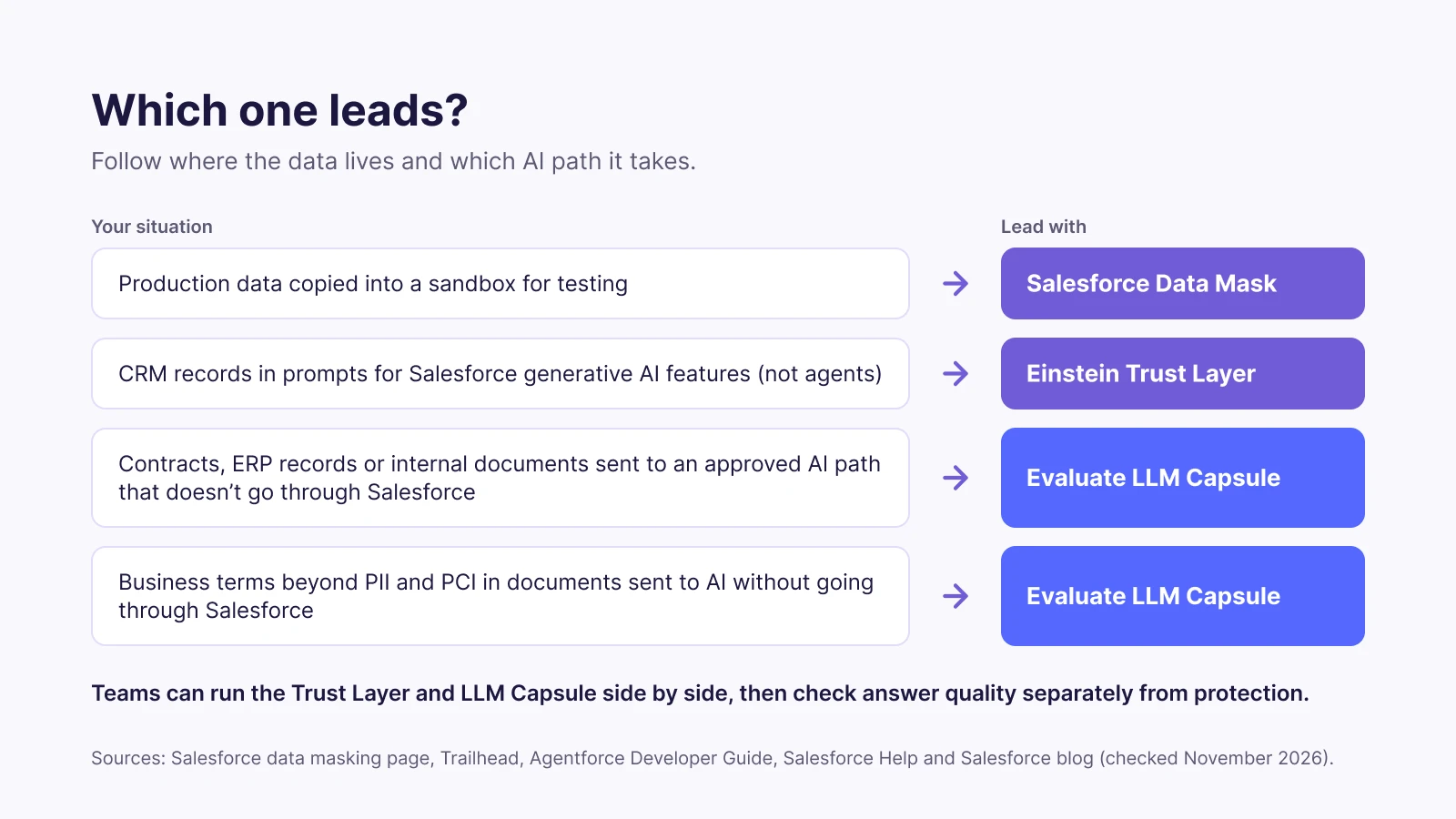
CUBIG also confirms supported models, deployment location, and restore scope for each customer environment and contract. Teams should check those details before choosing a design and should not assume a ready-made Salesforce connector. At the data-flow level, the split looks like this: CRM data in Salesforce generative AI features stays with the Trust Layer where its masking applies, and contracts, ERP records, and internal documents bound for an approved AI path that doesn’t go through Salesforce are where a team evaluates LLM Capsule.
Which one should lead for your team?
A team that already uses Salesforce doesn’t need to replace a Salesforce protection to evaluate LLM Capsule. Each tool leads in a different place.
- Salesforce Data Mask leads when the need is sensitive data in sandbox orgs.
- The Einstein Trust Layer leads when the need is selected PII and PCI in prompts on Salesforce generative AI features where its masking applies.
- LLM Capsule leads the evaluation when the team sends data, such as contracts or ERP records from outside Salesforce, to an approved AI path that doesn’t go through Salesforce, especially when business values beyond PII and PCI need protection.
- For Agentforce agents, Salesforce says LLM data masking is disabled, so a team should review Salesforce’s current agent guidance before sending sensitive CRM data through an agent.
A team can run the Trust Layer and LLM Capsule side by side, split by where the data lives and which AI path it takes. Security and legal reviewers can use four questions in the design review:
- Which sensitive values does each setup detect or protect?
- Which relationships must the model keep to finish the task?
- Which AI paths may receive the protected data?
- Which system restores original values, and who may reveal an original value on screen?
Both setups restore original values in the AI response; the customer decides who may reveal an original value on screen.
Where a task can run through both setups, compare them on that task under the same protection conditions. For data only one setup can reach, compare LLM Capsule with the team’s current method. Give each setup the same source data, protect the same values, keep the same relationships, and run the same AI task. Then count four results: protection misses, answer errors, incorrect restoration, and how much manual checking the team needed. Feature pages can’t give that evidence; a side-by-side run on your own workflow can.
Talk to CUBIG about testing LLM Capsule on one of your tasks.