
Suppose launch is two weeks away and a shopper emails a small online store: “Where’s my order? If it hasn’t shipped, I’d like a refund.” The demo tested those requests separately, so nobody knows what the assistant does with both.
A production readiness checklist for an AI product is a short list of conditions the product must meet on real user inputs before it reaches customers. A production readiness checklist names one task and one pass criterion, lists what the product must not do, and confirms that every output can be traced and that sending can be switched off.
Based on an essay by Bogum Yoo, COO, CUBIG Corp.
Key takeaways
- A production readiness checklist for an AI product names one task, one pass criterion and the actions the product must not take, and the team checks them on real user inputs before launch.
- Count output as usable only when the user finishes the task with it, measured on the user’s own inputs; accuracy on a test set is a separate measure.
- Do not launch with actions taken for the user without review, untested answer scope, unchecked data sources or a cost per task the team cannot explain.
- Turn unready features off and keep a not-ready list with the condition that would let each one ship.
- Rerun the checklist when a new customer, policy or model arrives; a pass for one customer does not cover the next.
What is a production readiness checklist for an AI product?
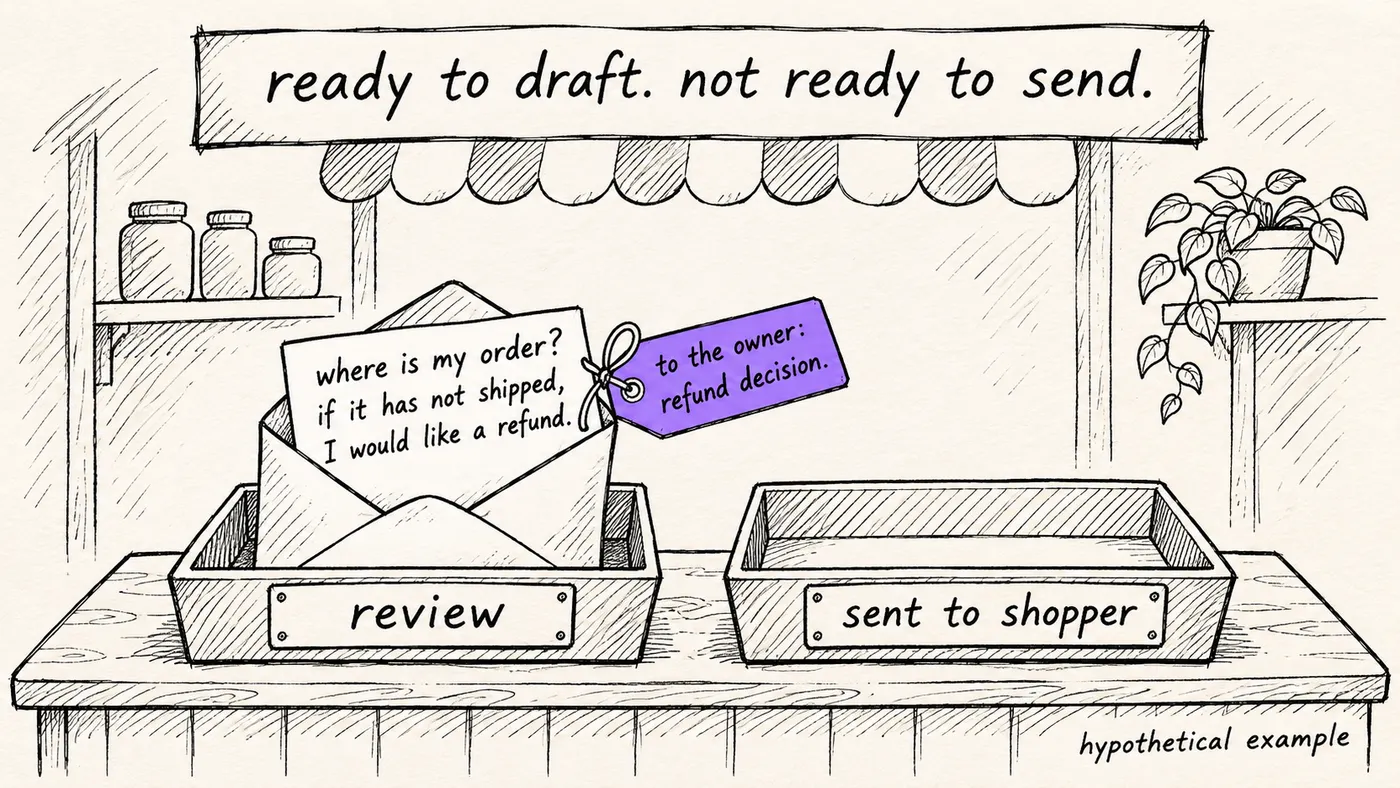
A production readiness checklist for an AI product records what the team checked before launch and what the product is not yet allowed to do. In the email assistant example, the store owner reviews every draft, auto-send stays off, and messages that need a refund decision go straight to the owner. The team decides whether drafting is ready by running the assistant on the store’s own inbox and recording which replies the owner sends, edits or rewrites from scratch.
Google researchers made a related point for machine learning systems in general. The paper The ML Test Score (Breck et al., 2017) states that “testing and monitoring are key considerations for ensuring the production-readiness of an ML system” and lists 28 specific tests and monitoring needs.
How is it different from a standard product launch checklist?
Engineering launch checklists already ask about capacity, dependencies and failure modes. An AI production readiness checklist adds questions about model behavior, which is hard to specify in advance: what the model produces on inputs nobody chose, and who reviews its output before a customer sees it.
Google already tests new software against real user traffic. Google’s SRE book chapter Reliable Product Launches at Scale describes canary servers that “detect dangerous effects from the behavior of the new software under real user traffic,” and client features that can be turned on through server configuration, so the team can “simply switch the feature off.” That chapter describes large web services rather than AI products, but the two habits carry over: test on real inputs, and keep an off switch.
What should the checklist cover before an AI product launch?
The checklist confirms that the core task works on inputs the team did not choose, that the product knows what it must not do, and that the team can trace every output and switch sending off.
- Test on real customer inputs. Ask a few pilot stores for a week of their actual customer emails, with their permission, instead of reusing the demo set.
- Define one task and one pass criterion. For the email assistant, the pass criterion is a draft the store owner sends unchanged or with wording edits only.
- List what the product must not do, and test those cases on purpose. Promising a refund, changing an order and giving legal advice are examples.
- Check the failure path. Decide what the user sees when the model times out, returns nothing or is unsure.
- Make every output traceable. Keep the input, the prompt version, the model, the output and what the user did with it.
- Confirm that sending can be disabled and the previous prompt restored. Once a reply reaches a customer, the owner needs a way to follow up.
- Know the cost per task at the expected usage. A price the team cannot explain per task is hard to defend later.
A demo inbox with separate examples for order updates and refunds does not show what the assistant does when a shopper asks for both in one email.
What counts as usable output?
Usable output means the user finishes the task with the output instead of redoing it, measured on the user’s own inputs. Accuracy on the team’s test set is a different measure.
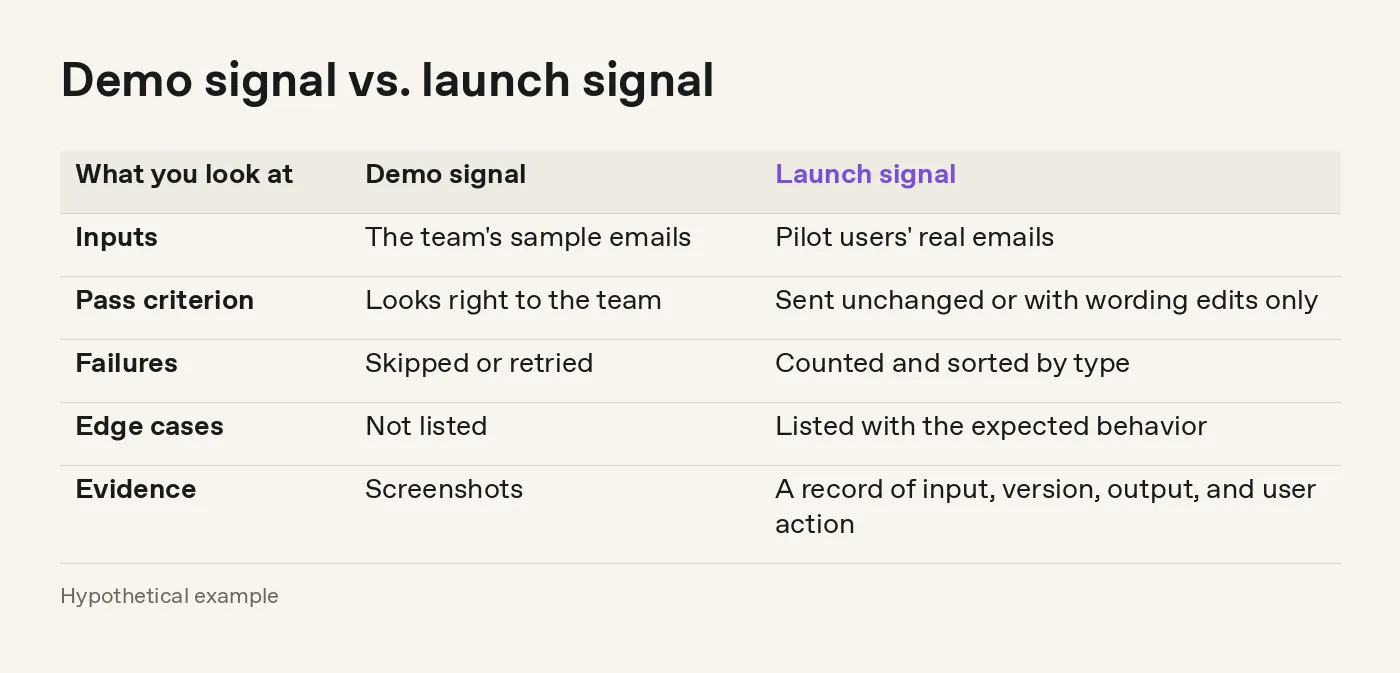
For the email assistant, the team counts a draft as usable if the owner sends it unchanged or edits only the wording. If the owner has to correct an order status, remove a refund promise or write the reply from scratch, the team counts that email as a miss.
The count includes every email in the drafting scope, timeouts and empty responses included. The team counts emails meant for the owner, such as refund decisions, separately and checks that the owner received the original message and can see why the assistant handed it over.
The team sets the bar before the pilot starts. A bar decided after the results arrive tends to move to wherever the results landed.
What should an AI product not launch with?
An AI product should not launch with anything that can make a promise, move money or act for the user without review, or with anything the team cannot observe.
- Actions taken for the user without review.
- Answers outside the scope the team tested.
- Data sources the team has not checked.
- A price the team cannot explain per task.
- Claims the evidence does not support, such as accuracy rates or time saved that nobody measured on real use.
In the email assistant launch, drafts appear in a review inbox, and nothing reaches a shopper until the owner sends it. An email that asks for a refund arrives without a draft, with the original message and a one-line reason for the handover. If the assistant times out, the inbox marks the email as having no draft instead of showing an empty reply.
Teams that want a broader reference can use the NIST AI Risk Management Framework (AI RMF 1.0, January 2023), a voluntary framework for bringing trustworthiness considerations into the design, development, use and evaluation of AI products, services and systems.
How do you handle features that are not ready?
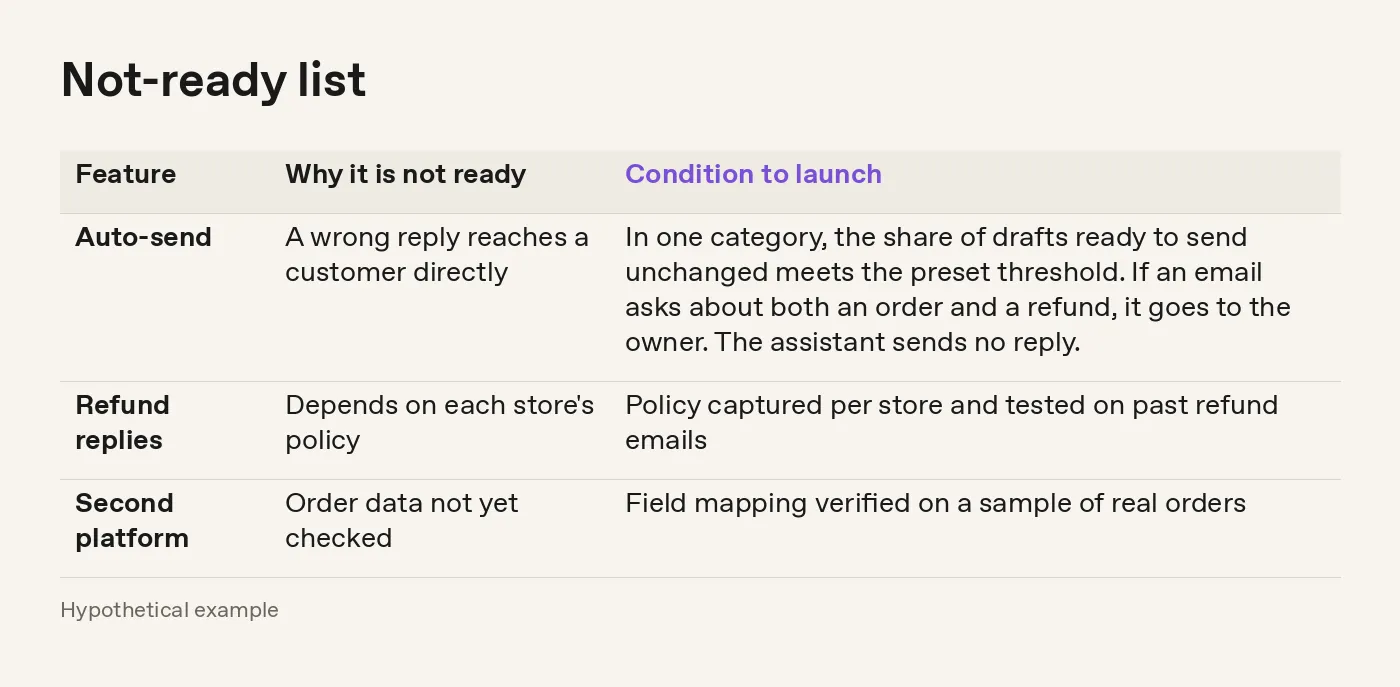
The team turns an unready feature off, tells users plainly, and keeps a list of what is not ready, with the condition that would let each item ship. A not-ready list turns each postponed feature into a test the team can run later.
Where does CUBIG fit in launch testing?
When a second store joins the pilot, the team reruns the mixed order-and-refund email against that store’s own refund and shipping policy. The first pilot shows how the assistant handled the first store’s rules, not the second store’s.
CUBIG uses Syntitan, its AI-ready data platform, to prepare test cases from work documents. Syntitan’s Ready for Agent generates Tasks and Cases from a team’s SOP or policy and provides a Case CSV for review, an Agent input CSV and a run guide; the team then runs the cases in its own agent environment.
In an internal comparison of the generation process behind this work, using five procedure documents and the same generative model, an internal evaluation model classified 67 of 80 candidate cases from CUBIG’s generation process as unexpected situations, compared with 23 of 80 from single-step generation. No agent was run, and in that first round the single-step method generated only once and scored higher on diversity (0.97 vs 0.79).
For the email assistant, one case worth keeping is the shopper who asks about an order and a refund in the same message. Before launch, the team puts that email through the product and checks the owner’s inbox: did the original message arrive, can the owner see why it was handed over, and did anything go out to the shopper?
A production readiness checklist does not show that the product works for every customer. The team reruns it when a new customer, policy or model arrives. See how Syntitan prepares test cases from your own work documents.