
Your team has approval for a churn prediction pilot and a CRM export ready for review. Before the kickoff meeting, the data lead must decide whether that export can support the task.
An AI readiness checklist is a short list of yes/no questions that your team answers before starting an AI project. The checklist confirms whether the data for one specific task can be used, fits the task, can be evaluated against a fixed baseline and can be traced back to its source.
By Bae Ho, Founder & CEO, CUBIG Corp. · Updated November 2026.
Gartner’s February 26, 2025 press release, Lack of AI-Ready Data Puts AI Projects at Risk, reports that 63% of organizations either do not have or are unsure whether they have the right data management practices for AI. Gartner based that figure on a July 2024 survey of 1,203 data management leaders.
Key takeaways
- An AI readiness checklist tests whether a specific dataset can support a specific AI task, not whether the organization as a whole is prepared for AI.
- The checklist covers five questions: usage rights, task fit, evaluation rules, traceability and the changes that require another review.
- A dataset can pass a completeness check while its labels do not match what the task needs.
- A failed check does not automatically stop the project; the team learns what to fix before kickoff.
What is an AI readiness checklist?
An AI readiness checklist helps your team answer one practical question: can the data you have support the AI task you want to run?
The checklist starts with a specific use case. A churn prediction project, a predictive maintenance model and a document classification task need different data. Your team therefore checks the dataset against the intended task instead of a general definition of good data.
The checklist also separates questions that teams often combine. A dataset can contain complete records but lack the right labels. The business can have permission to use the data internally but not to send certain values to an external AI service. The team can understand the dataset but lack a fixed evaluation baseline.
Each question produces a yes or no answer. A no answer marks a condition that your team investigates, resolves or explicitly accounts for before the project starts.
CUBIG’s own review of a public predictive maintenance dataset in November 2026 shows why the questions stay separate: all 10,000 records were complete, yet 27 records carried a failure label that disagreed with the failure-mode flags. The section on completeness checks below explains the finding.
Organizational AI readiness is a separate question. Strategy, skills, budget and culture fall outside this checklist, which covers only the data for one project. For the broader organizational question, see the AI readiness assessment glossary entry.
How is an AI readiness checklist different from an AI readiness assessment?
An AI readiness checklist and an AI readiness assessment serve different purposes. Your team uses the checklist to make one decision before kickoff. CUBIG’s AI readiness assessment for data examines data more broadly and diagnoses problems across six axes.
CUBIG’s AI readiness assessment article describes six axes for examining enterprise data. A data readiness assessment evaluates in depth whether this particular data can support a defined task and what preparation it needs. The checklist turns that question into yes/no checks the team answers before kickoff.
A production readiness checklist comes later. Your team uses that checklist before launching an AI product, when the review concerns the conditions for production use. CUBIG’s production readiness checklist for AI products covers that stage.
| AI readiness checklist (this article) | AI readiness assessment | Production readiness checklist | |
|---|---|---|---|
| When you use it | Before kickoff, for one AI task | When you need a broader diagnosis of your data | Before launching an AI product |
| Question it answers | Can this dataset support this task? | What condition is the data in across several readiness axes? | Is the AI product ready for launch? |
| Scope | One dataset and one defined use case | Several readiness axes, possibly across use cases | The conditions for production use of an AI product |
| Output | Yes or no answers, with the problems to fix before kickoff | A diagnosis of the data and the areas that need work | A launch decision and the items still open |
Your team can use all three at different stages. CUBIG’s AI readiness assessment for data finds general data problems, the AI readiness checklist tests one project before kickoff and the production checklist supports the later launch decision.
What should an AI readiness checklist cover for your data?
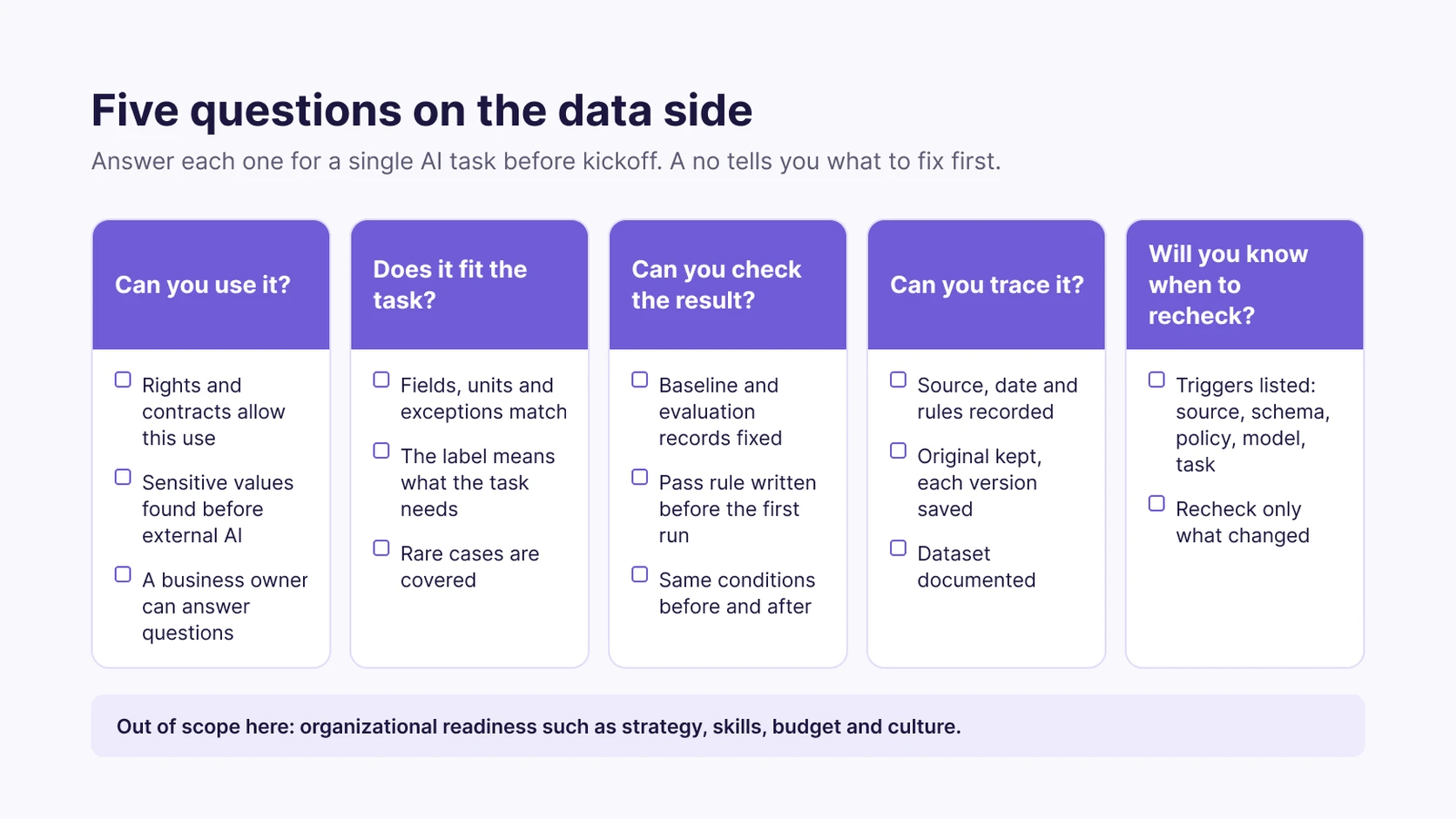
Your team can organize the AI readiness checklist around five questions. Each question covers a different condition that decides whether the dataset can support the intended task.
Can you use this data for this task?
The first question concerns permission and appropriate use. A technically suitable dataset cannot support a project if the intended use conflicts with permissions, contracts or residency rules.
- Do the permissions, contracts and data residency rules allow your team to use this data for this AI task?
- Has your team identified sensitive or controlled values before sending any of the data to an external AI service? The AI data leakage entry describes how those values can leave their boundary.
- Does the business side have an owner who can answer questions about the dataset, its fields and the meaning of its values?
The business owner explains why the organization collected the data and what the important fields represent. The data lead records open questions instead of assuming that a technical description gives the full business context.
Does the data fit the task?
The second question concerns whether the dataset holds the information the model needs. Your team checks what each field means, not only whether it is present and correctly formatted.
A column named customer_status can mix several business states. A field called failure can mean a recorded event, a prediction or a specific operational definition. Your team confirms which meaning applies before treating the field as a model target.
- Do the dataset’s structure, field meanings, units, relationships and exceptions match the intended task?
- Does the label or target mean exactly what the AI task needs to predict or classify?
- Does the dataset cover the rare cases and exceptions that the task depends on, not only the common ones?
The label check deserves the most attention. A complete target column can still contain labels that disagree with the business definition, so the business owner confirms what each target value means before the team uses it for training or evaluation.
The coverage check concerns representation. A dataset dominated by ordinary cases may not contain enough of the exceptions that matter to the task. Your team lists the less common cases the model has to handle and checks whether the dataset includes them.
Can you check the result?
The third question concerns evaluation. Your team needs a fixed way to compare results before and after data preparation.
- Has your team fixed the baseline and the evaluation records before starting data preparation?
- Has the team written down the pass rule before the first model run?
- Will the team use the same evaluation conditions for the before and after comparison?
Without a baseline, the team cannot show whether preparation changed the result. Without a written pass rule, two reviewers can judge the same result differently.
The project owner agrees on the pass rule before anyone sees the first result on prepared data. A rule written after the results invites the team to move its expectations to fit the outcome. The evaluation data and conditions also stay fixed between runs, so differences between the runs point to the data change rather than to different evaluation conditions.
Can you trace it?
The fourth question concerns where the dataset came from and what happened to it. Your team should be able to explain the source, the extraction date and every preparation step before the model uses the data.
- Has your team recorded the source, extraction date and preparation rules for the dataset?
- Has the team kept the original data unchanged and saved each prepared version separately?
- Does the dataset documentation explain what the dataset contains and how the organization collected it?
The documentation check can follow Gebru et al.’s paper Datasheets for Datasets, which proposes that every dataset come with a datasheet documenting its motivation, composition, collection process and recommended uses. Your team can answer those questions to explain the dataset beyond its column names.
A file name or export date alone does not tell a later reviewer how the data was collected or which preparation rules changed its contents. A written record of the source and preparation rules connects each prepared version to its source.
Will you know when to check it again?
The fifth question concerns changes that make an earlier review outdated. Your team names the conditions that trigger another check before the project starts.
- Has your team listed the changes that trigger a recheck: source system, schema, policy, model or task?
- Does the team have a plan to recheck only the parts each change affects?
A source system change can affect the fields or relationships your team reviewed. A schema change can affect validation rules. A policy change can affect whether the data remains usable for the intended purpose.
The Google paper Data Validation for Machine Learning (Breck et al., SysML 2019) explains why data checks continue after a model is built. The authors note that errors in the input data can nullify any benefits on speed and accuracy for training and inference. Their validation system, deployed in Google’s TFX platform, detects anomalies in data fed into ML pipelines. The paper discusses the challenges of unexpected patterns, schema-free data and training/serving skew.
Which checks catch problems that a completeness check misses?
A completeness check confirms that required fields contain values. Completeness alone cannot show whether those values carry the meaning an AI task needs.
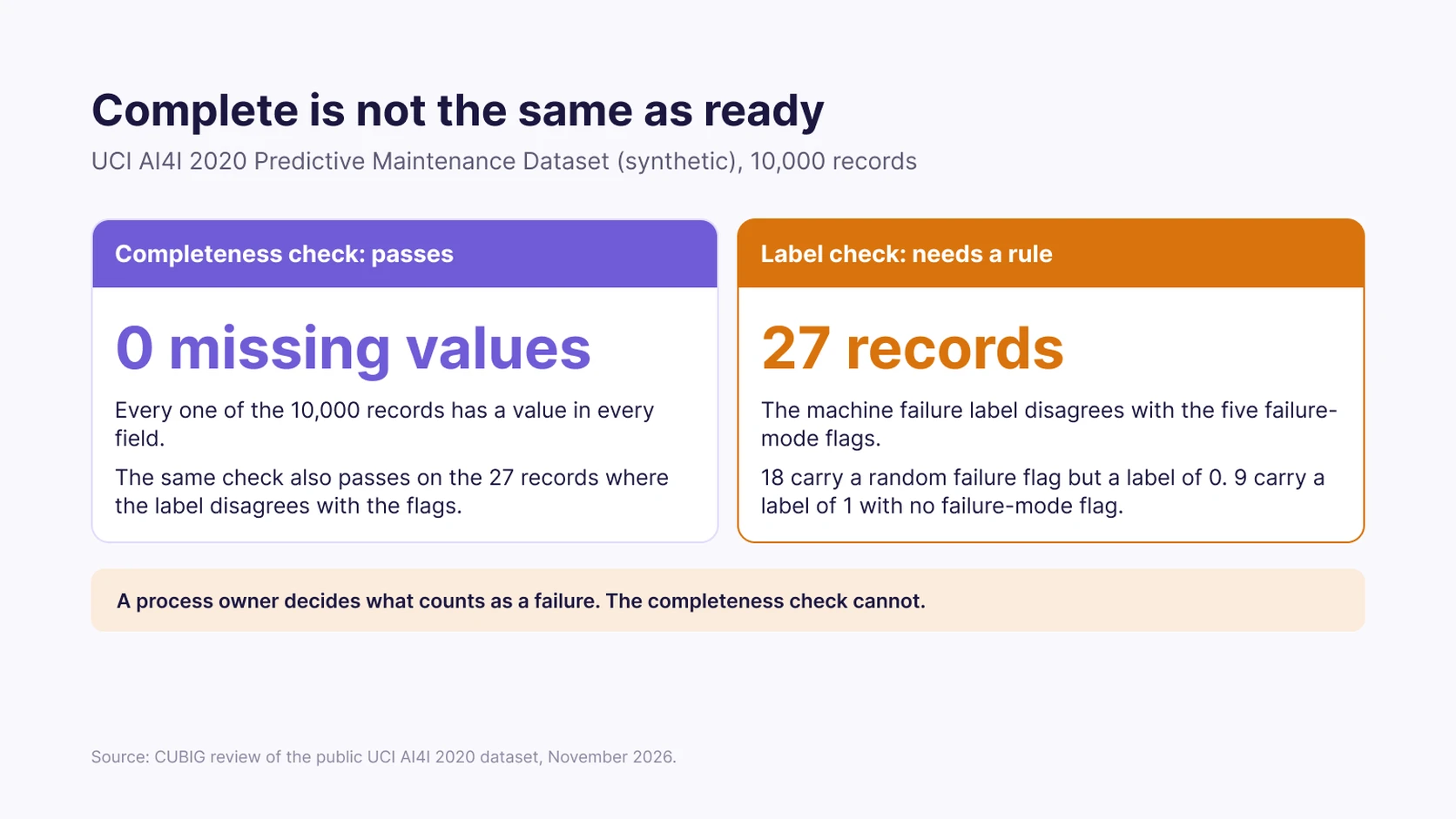
CUBIG examined the public UCI AI4I 2020 Predictive Maintenance Dataset in November 2026, as described in CUBIG’s predictive maintenance data checks article. The dataset is synthetic and contains no missing values. Of its 10,000 records, 339 are labeled as machine failures.
CUBIG’s November 2026 review found 27 AI4I records where the machine failure label disagrees with the five failure-mode flags. Eighteen records carry a random failure flag but a failure label of 0. Nine records carry a failure label of 1 with no failure-mode flag.
In CUBIG’s 2026 review, none of those 27 AI4I records has a missing value, so a completeness check passes. Someone who understands the process has to decide what counts as a machine failure. The finding applies to the AI4I dataset only; it shows why your team checks label meaning separately from missing values.
The research on data cascades describes how such problems travel. In their 2021 ACM CHI paper, Everyone Wants to Do the Model Work, Not the Data Work: Data Cascades in High-Stakes AI, Sambasivan et al. interviewed 53 AI practitioners in India, East and West African countries and the USA.
Sambasivan et al. (2021) define data cascades as compounding events in which data issues cause negative downstream effects. Among the practitioners they interviewed, the study reports that data cascades are pervasive, with 92% prevalence, and invisible and delayed, but often avoidable.
A label misunderstanding at the start can carry through preparation, training and evaluation. Your team therefore checks both structure and meaning: schema validation finds unexpected fields or patterns, and a business review confirms that a value represents the event the task requires. The data validation glossary entry covers the technical checks.
CUBIG Shorts
Cataloged. Quality Rules Pass. Ready for What?
A short take on the same point: data can be cataloged and pass quality rules without being ready for a specific task.
What should you do when a check fails?
A failed check names a problem that your team needs to understand before kickoff. The next step depends on which check failed.
| Failed check | What it usually means | Next step |
|---|---|---|
| Usage rights unclear | The team has not confirmed that the intended AI use is permitted. | Clarify the permissions and contracts, or narrow the use case to an approved purpose. |
| Label does not match the task definition | The target field does not consistently represent the outcome the model needs. | Have the domain owner decide the label rule, then record the rule and apply it consistently. |
| Rare cases missing | The dataset lacks the exceptions or less common outcomes the task depends on. | Add the underrepresented cases or rebalance the distribution, then recheck the data against the task. |
| No baseline or pass rule | The team cannot make a consistent before and after comparison. | Record the baseline and write the pass rule before the first evaluation run. |
| No record of the source or preparation rules | The team cannot explain where the data came from or how it changed. | Start recording the source, extraction date, preparation rules and separate versions. |
A failed item does not always mean stop. A failed item means the team knows what to fix before kickoff.
Some failures need a decision from the business owner. Other failures need changes to the dataset or its documentation. The data lead separates problems the team can resolve through preparation from problems that call for a different or narrower use case.
The checklist record ends with a clear decision. Each failed item gets an owner, a next step and a condition for calling the issue resolved. If the team proceeds with a narrower use case, the decision record names the data the team actually reviewed.
When should you run the checklist again?
An AI readiness checklist is not a permanent pass or a certificate. Readiness describes the current relationship between a dataset and a task, so your team reviews it again when that relationship changes.
Gartner’s February 2025 release makes the same point. Roxane Edjlali, Senior Director Analyst at Gartner, says AI-ready data is not “one and done,” and that the data must be representative of the use case, including the patterns, errors and outliers the specific use needs.
Your team reruns the relevant checks when one of these conditions changes:
- Source data: the source system changes or the team starts using a different source.
- Schema: the structure, fields, relationships or units change.
- Policy: permissions, contracts or data residency requirements change.
- Model: the team changes the model used for the task.
- Task: the business changes the target, the intended outcome or the use case.
A change does not invalidate every earlier check. Your team identifies which conditions changed and repeats only the checks those changes affect. A schema change calls for another structure review; a new target definition calls for the business owner to confirm the label and for a new evaluation baseline.
The data lead keeps the earlier records, so the team can compare new conditions with the previous review and explain why each check still holds or why it was repeated.
Where does CUBIG fit in an AI readiness checklist?
CUBIG prepares and checks enterprise data so organizations can use it for specific AI tasks. CUBIG’s products work alongside existing data platforms and do not replace them.
Syntitan is CUBIG’s AI-ready data platform. Syntitan keeps the original dataset intact; each Use Case gets a Project that starts from a copy, and Syntitan saves each preparation or check result as a Version. That record answers the checklist question about keeping the original data unchanged and saving each prepared version separately.
Syntitan’s Ready for Raw Data diagnoses a dataset on six axes: usability, integrity, context, consistency, reproducibility and traceability. Ready for Raw Data also proposes fixes, so your team can see which data conditions need work before a specific AI task starts.
Syntitan’s Ready for Model compares results before and after preparation for a specific model task under the same evaluation conditions. Ready for Model currently works on supported yes/no classification tasks with four built-in models.
DTS, Data Enablement for AI, adds underrepresented cases and adjusts skewed distributions so the data fits a specific AI task. Inside Syntitan, DTS works as the data preparation engine.
LLM Capsule supports the step after the checklist question about sensitive values sent to an external AI service. LLM Capsule replaces sensitive or controlled values with context-preserving substitutes before the data is sent, then restores the original values in the response. Syntitan, DTS and LLM Capsule can each be adopted on their own.
Your team still defines the task, confirms usage permissions, agrees on label meanings and sets the evaluation rules. AI-ready data is not a one-time certification or a score, so the team keeps checking the data against the task as conditions change.
Try it on your data. Syntitan prepares and checks the data behind a specific AI task.