Hello, this is CUBIG, the company behind Syntitan, the AI-Ready Data Platform for enterprise AI. 💎
An AI workflow produces a result that differs from the one your team reviewed last week. A structured data failure review begins by locating the evidence, not by guessing the cause from the visible output. The output rarely tells you where to begin or which record will narrow the investigation.
The difference may have surfaced before the run, during processing, or only after the result was produced. It may concern the data itself, an operational decision, or missing evidence. Starting with a presumed root cause can send the review toward the wrong system and the wrong owner.
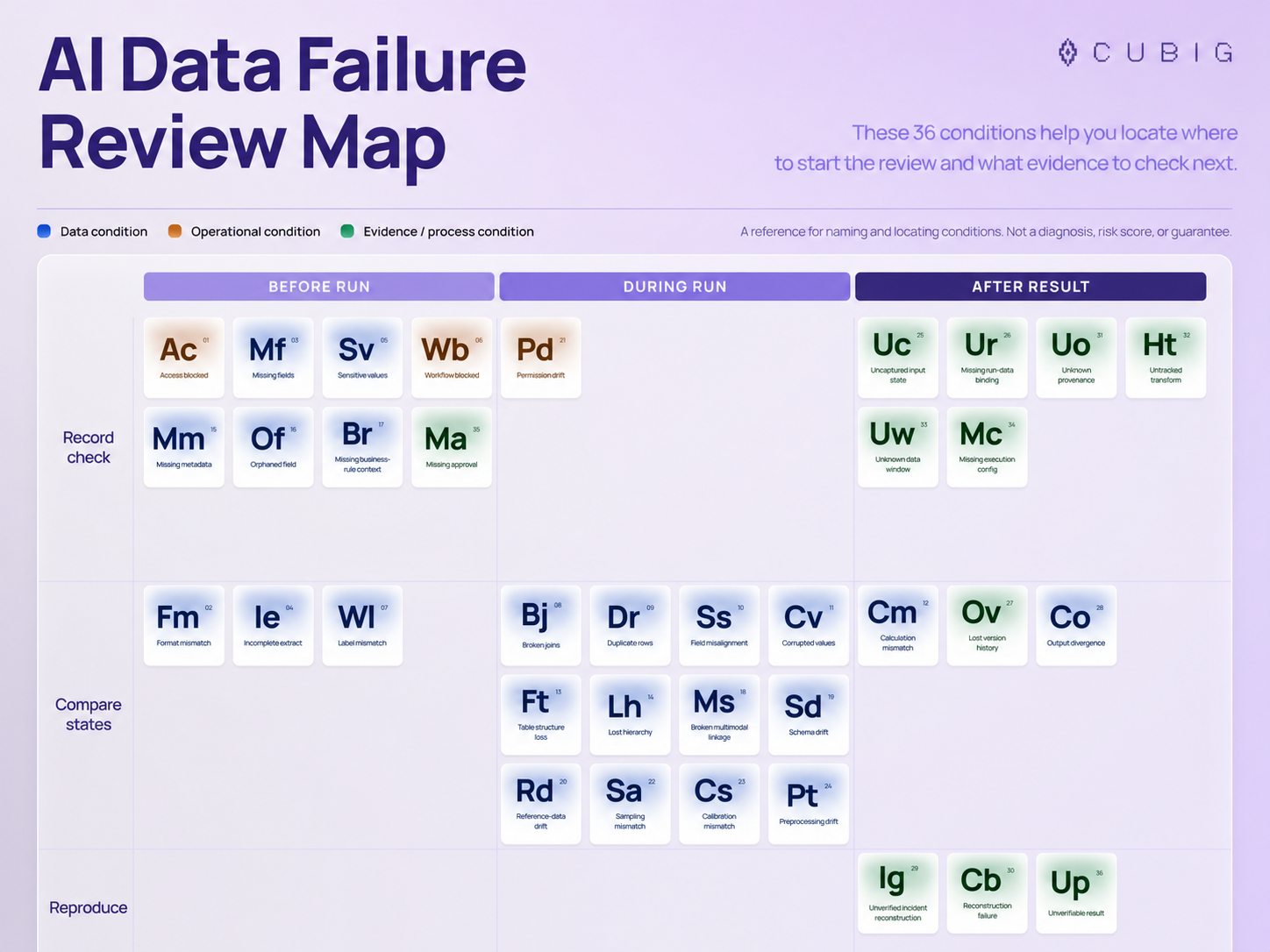
The AI Data Failure Review Map offers a more disciplined starting point. It organizes 36 working review conditions by workflow stage, evidence action, and Condition type. Its purpose is practical: locate where to start the review, name what may need checking, and identify the next evidence to inspect.
The map is not a diagnosis, risk score, root-cause determination, universal taxonomy, or automated conclusion. It is a working editorial reference for structuring a review.
When the output changes, the first problem is review location
A changed result is an observation, not an explanation. Even when a difference appears in an output value, the relevant review condition may sit elsewhere:
- an access decision or approval was missing before the run;
- a schema, reference dataset, calibration, or preprocessing step differed during the run;
- the exact input state, execution configuration, or transformation history was not retained after the result.
These conditions require different evidence. A schema question calls for a version and diff. A permission question calls for an effective permission snapshot. A reproduction question calls for a bound package of input state, configuration, code, dependencies, and result.
A more useful opening question is: Where should the review begin, and what evidence should we inspect next?
The map is a review index, not a diagnosis
The 36 conditions mix three kinds of review objects intentionally:
- Data conditions concern values, structure, relationships, context, or version state that can be inspected in data or transformations.
- Operational conditions concern access, permission, or workflow state that can block use or execution.
- Evidence/process conditions concern missing lineage, decisions, bindings, or reconstruction capability that can prevent a confident review.
That mix matters. Calling every item a data defect would overstate what the evidence shows. “Missing approval,” for example, is not proof that data changed. “Unknown provenance” is an evidence gap, not a finding about the result’s correctness.
The map also does not encode severity, likelihood, frequency, causality, priority, or risk. Empty positions do not represent undiscovered failures or product gaps. The coordinates help a reviewer navigate; they do not rank the conditions.
Read the map in three passes
The map becomes easier to use when you read it in a fixed order.
A review moves from location to evidence
Use the map as a sequence of decisions, not as a score or automated diagnosis.
1. Locate the workflow stage
Start with the point in the workflow where the review can most usefully begin:
- Before run: readiness, access, input context, and approval conditions.
- During run: relationships, transformations, schema, permissions, sampling, calibration, and other execution-time conditions.
- After result: state capture, lineage, output comparison, reconstruction, and verifiability conditions.
This stage is a review location, not a claim about when the cause occurred.
2. Choose the evidence action
Next, identify the action most likely to reduce uncertainty:
- Record check: locate a decision, manifest, identifier, configuration, binding, or lineage record.
- Compare states: compare source and extract, expected and observed relationships, tested and executed versions, or bound outputs.
- Reproduce: replay or reconstruct from retained inputs, code, configuration, dependencies, and state.
The action turns a broad concern into a concrete next step. “Check for preprocessing drift” is vague. “Compare transformation code and parameters across the tested and executed runs” specifies the evidence.
3. Confirm the Condition type
Finally, distinguish whether the review concerns data, operations, or the evidence process. This helps route the question to the right owner and prevents an evidence gap from being described as a proven data defect.
Together, the three passes answer three different questions: where to look, what to do next, and what kind of condition is under review.
Example path: Sd -> Mm -> Ur
Suppose a workflow produces a different result after moving from testing to execution. One possible review path is:
Sd— Schema drift: Compare the schema used in testing with the schema used in execution.Mm— Missing metadata: Locate the definitions, units, ownership, and interpretation required for the run.Ur— Missing run-data binding: Trace the run to the exact input data state.
The sequence moves from an observable structural comparison to missing context and then to the evidence needed to bind the run to its input. It does not claim that schema drift caused missing metadata, that missing metadata caused a binding gap, or that these three conditions explain a real incident. A different case may require a different path.
The value of the sequence is procedural. It replaces a broad suspicion with three bounded checks: compare the schema, locate the context manifest, and verify the run-to-state binding.
The searchable 36-condition review reference
The following tables preserve the working names, symbols, axes, evidence actions, and inspection prompts. They are grouped by workflow stage so a reviewer can scan the most relevant part of the workflow first.
Before run
| No. | Symbol | Review condition | Condition type | Axis | Evidence action | What to inspect next |
|---|---|---|---|---|---|---|
| 01 | Ac | Access blockedThe data or system the AI task needs cannot be reached under the current permissions or routes. | Operational | Usability | Record check | Locate the access decision, owner, scope, and approved or blocked route. |
| 02 | Fm | Format mismatchThe data arrives in a format the next step cannot read as intended. | Data | Usability | Compare states | Compare the source structure with the working-format output. |
| 03 | Mf | Missing fieldsFields the task requires are absent from the prepared input. | Data | Usability | Record check | Check the required-field list against the prepared input. |
| 04 | Ie | Incomplete extractThe extract covers fewer records, columns, or dates than the source it came from. | Data | Usability | Compare states | Compare source coverage, counts, and boundaries with the extract. |
| 05 | Sv | Sensitive valuesThe input contains values whose handling has not been decided or recorded. | Data | Usability | Record check | Locate the classification, handling decision, and working-value record. |
| 06 | Wb | Workflow blockedA step in the AI workflow cannot proceed because a required condition or decision is missing. | Operational | Usability | Record check | Identify the blocked step, decision owner, and unmet condition. |
| 07 | Wl | Label mismatchLabels in the data do not match the approved reference set or the reviewed sample. | Data | Integrity | Compare states | Compare labels with the approved reference set and reviewed sample. |
| 15 | Mm | Missing metadataDefinitions, units, or ownership needed to interpret the data are absent. | Data | Context | Record check | Locate the definitions, units, ownership, and interpretation needed for the run. |
| 16 | Of | Orphaned fieldA field cannot be traced to its parent record, definition, or rule. | Data | Context | Record check | Trace the field to its parent record, definition, or applicable rule. |
| 17 | Br | Missing business-rule contextThe rule that governs how the data applies, including its scope and effective dates, is not attached. | Data | Context | Record check | Identify the applicable rule and its effective version. |
| 35 | Ma | Missing approvalThe approval, its scope, or its effective time is not recorded. | Evidence/process | Traceability | Record check | Locate the approver, approved scope, decision, and effective time. |
During run
| No. | Symbol | Review condition | Condition type | Axis | Evidence action | What to inspect next |
|---|---|---|---|---|---|---|
| 08 | Bj | Broken joinsRecords that should connect across tables do not match, so relationships are lost. | Data | Integrity | Compare states | Compare expected and observed relationships, keys, and unmatched records. |
| 09 | Dr | Duplicate rowsThe same record appears more than once under the defined uniqueness rule. | Data | Integrity | Compare states | Compare the input and processed set using the defined uniqueness keys. |
| 10 | Ss | Field misalignmentValues have shifted into the wrong fields or positions during processing. | Data | Integrity | Compare states | Compare field order, slot position, and structure before and after processing. |
| 11 | Cv | Corrupted valuesValues were changed or damaged so they no longer match the source. | Data | Integrity | Compare states | Compare changed values with the source and applicable repair rule. |
| 13 | Ft | Table structure lossTable boundaries or cell relationships are lost when the data is transformed. | Data | Context | Compare states | Compare table boundaries and relationships before and after transformation. |
| 14 | Lh | Lost hierarchyParent and child relationships in the data are flattened or broken. | Data | Context | Compare states | Compare the expected hierarchy with the processed representation. |
| 18 | Ms | Broken multimodal linkageLinks among text, tables, and images from the same source document are lost. | Data | Context | Compare states | Compare links among text, tables, images, and their source document. |
| 19 | Sd | Schema driftThe schema at execution differs from the schema used in testing. | Data | Consistency | Compare states | Compare the schema used in testing with the schema used in execution. |
| 20 | Rd | Reference-data driftReference values such as codes or categories differ between testing and execution. | Data | Consistency | Compare states | Compare reference data used in testing and execution. |
| 21 | Pd | Permission driftEffective permissions changed between the decision and the run. | Operational | Consistency | Record check | Locate the effective permissions at the decision and run times. |
| 22 | Sa | Sampling mismatchThe executed sample does not represent the intended population. | Data | Consistency | Compare states | Compare the executed sample with the intended population and sampling rule. |
| 23 | Cs | Calibration mismatchThe calibration used at execution differs from the one used in testing. | Data | Consistency | Compare states | Compare the calibration used in testing and execution. |
| 24 | Pt | Preprocessing driftTransformation code or parameters differ between the tested and executed runs. | Data | Consistency | Compare states | Compare transformation code and parameters across tested and executed runs. |
After result
| No. | Symbol | Review condition | Condition type | Axis | Evidence action | What to inspect next |
|---|---|---|---|---|---|---|
| 12 | Cm | Calculation mismatchA computed result differs from the approved reference calculation. | Data | Integrity | Compare states | Compare the result with the approved reference calculation and rule version. |
| 25 | Uc | Uncaptured input stateThe exact data state behind a result was not recorded. | Evidence/process | Reproducibility | Record check | Locate the exact data-state identifier that should support the result. |
| 26 | Ur | Missing run-data bindingA run cannot be traced to the exact input data state it used. | Evidence/process | Reproducibility | Record check | Trace the run to the exact input data state. |
| 27 | Ov | Lost version historyEarlier versions of a data object are no longer addressable. | Evidence/process | Reproducibility | Compare states | Compare the current object with the last addressable version used by the run. |
| 28 | Co | Output divergenceThe same bound data state and configuration produce different outputs. | Data | Reproducibility | Compare states | Compare outputs produced from the same bound state and configuration. |
| 29 | Ig | Unverified incident reconstructionAn incident explanation has not been checked by replaying or reconstructing the run. | Evidence/process | Reproducibility | Reproduce | Replay or reconstruct the run to separate evidence from assumptions. |
| 30 | Cb | Reconstruction failureA run cannot be rebuilt from the retained input, configuration, code, and dependencies. | Evidence/process | Reproducibility | Reproduce | Rebuild from the retained input, configuration, code, and dependencies. |
| 31 | Uo | Unknown provenanceThe source, owner, or acquisition time of the data is unknown. | Evidence/process | Traceability | Record check | Trace the result to its source owner, system, and acquisition time. |
| 32 | Ht | Untracked transformThe transformations applied before a result were not recorded in order. | Evidence/process | Traceability | Record check | Locate the ordered transformations applied before the result. |
| 33 | Uw | Unknown data windowThe time or record range a run used is not identified. | Evidence/process | Traceability | Record check | Identify the exact time or record window used by the run. |
| 34 | Mc | Missing execution configThe configuration, environment, or flags used at execution were not kept. | Evidence/process | Traceability | Record check | Recover the configuration, environment, and flags used in execution. |
| 36 | Up | Unverifiable resultA result cannot be checked because its state, run, and review evidence are incomplete. | Evidence/process | Traceability | Reproduce | Assemble the state, run, diff, and review evidence bundle, then attempt reproduction. |
The list is broad because review failures do not all take the same form. It is still bounded. Teams may need to rename, merge, or add conditions for their systems, controls, and evidence standards.
Evidence systems already preserve parts of the trail
The review map does not require one universal tool. Existing data and ML systems already preserve different parts of the evidence trail.
MLflow’s dataset tracking documentation describes dataset records that can include a name, digest, source, schema, and profile. Those fields can support checks involving dataset identity, structure, and context. They do not by themselves prove that every transformation can be reconstructed.
OpenLineage’s specification represents runs with unique identifiers. Its dataset version facet and execution parameters facet provide structures for version and configuration metadata. A specification makes evidence representable; it does not prove that a given implementation captured complete or correct records.
Within its documented scope, Databricks Unity Catalog lineage can help trace upstream sources while investigating unexpected results. That example remains specific to supported Databricks workflows and requirements.
Review quality depends on the evidence retained before, during, and after execution. A result cannot be reliably tied to a prior state if the relevant state, version, configuration, or lineage was never captured.
Where Syntitan fits and where it does not
In Syntitan, each successful processing step creates a new Version, so teams can refer back to the data used at the time and compare it with the previous state. That approach aligns with a review practice that keeps an addressable data state, links it to a run, compares relevant changes, and retains enough evidence to attempt reproduction. Tracking and reuse after changes are planned for December.
That alignment should not be read as a feature-by-feature mapping to the 36 conditions. The review map is not a Syntitan product checklist, and the current evidence does not support a claim that Syntitan automatically detects, diagnoses, prevents, or resolves every condition listed here.
The practical connection is narrower: when teams preserve verifiable states and their relationships to runs, they have stronger evidence for investigating differences than an output alone can provide.
Start with the next evidence, not a premature conclusion
When an AI result changes, a useful review begins by reducing uncertainty. Locate the workflow stage. Choose the evidence action. Confirm whether the condition concerns data, operations, or the evidence process. Then inspect the named record before drawing a conclusion.
The 36-condition map gives teams a shared vocabulary for that first pass. It helps a reviewer ask a narrower question and request evidence that can move the investigation forward; it does not supply the answer.
CUBIG’s view is that a reliable review needs evidence connecting the data state, the run, and the resulting difference. Syntitan is designed around that evidence path, keeping each processed result as a Version that can be compared with the previous state. It is not an automatic diagnosis of every condition in this map, but a way to preserve and examine the states and relationships a reviewer needs.
Build a review trail around verifiable data states. See how Syntitan supports the evidence path.